
LESSON DESCRIPTION
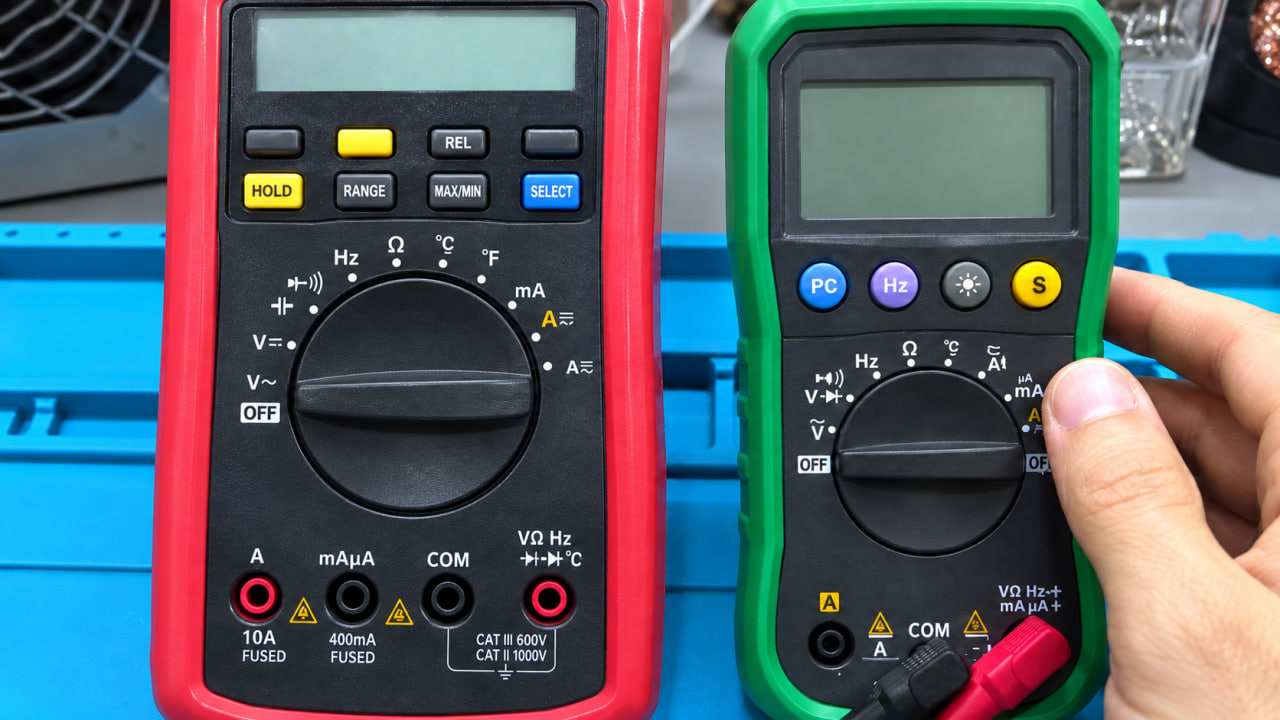
This video introduces the multimeter, one of the most important diagnostic tools in electronics and laptop motherboard repair. Learn how a multimeter is used to measure electrical values, test components, locate faults, and verify power rails during repair work.
• Analog and Digital Multimeters: Understand the difference between traditional analog meters with a needle scale and modern digital multimeters (DMMs), which are the standard choice for laptop, phone, TV, and control-board repair.
• Multimeter Types and Features: Explore compact and full-size meters, manual-ranging versus auto-ranging models, and advanced multimeters that may include extra functions such as waveform viewing.
• Main Measurement Modes: Learn the essential multimeter functions used in motherboard diagnostics:
o DC and AC voltage
o Resistance in ohms
o Continuity / buzzer mode for tracing connections and checking for shorts
o Diode-test mode
o Capacitance measurement
o Current measurement in µA, mA, and A
Additional functions such as frequency and temperature measurement are also introduced.
• Ports and Probe Connections: Learn the purpose of the COM terminal, voltage/resistance/diode terminal, and current terminals, as well as the correct placement of the black and red probes.
• Manual Ranging vs. Auto-Ranging: See why auto-ranging multimeters simplify resistance measurement by automatically selecting the appropriate range, while manual-ranging meters require the user to choose the range first.
• Probe Quality and Low-Resistance Measurements: Understand why probe and cable resistance matters. When testing low-resistance motherboard rails, the resistance of poor-quality probes is added to the displayed value and can lead to incorrect diagnostic conclusions.
• Needle-Tip and Tweezer Testers: Learn the advantages of fine needle probes for measuring small controller pins under a microscope and tweezer-style testers for fast testing of SMD resistors, capacitors, and diodes, especially on liquid-damaged boards.
• Measurement Safety and Correct Settings: Learn why the correct mode must be selected before testing. Using the wrong setting, such as resistance mode on a live voltage rail or an incorrect current input, can damage the meter or produce unreliable results.
• Accuracy and Tolerance: Understand that a multimeter has an expected measurement tolerance. For example, a 19 V power supply may read slightly below or above 19 V depending on the meter’s stated accuracy specification.
• Practical Repair Use: The lesson demonstrates a DC voltage measurement from a 19 V laptop-adapter output and explains the modes most frequently used in motherboard repair: DC voltage, resistance, continuity, and diode mode.
This video provides the essential foundation for using a multimeter confidently and accurately while diagnosing laptop motherboard faults and testing electronic components.
• Analog and Digital Multimeters: Understand the difference between traditional analog meters with a needle scale and modern digital multimeters (DMMs), which are the standard choice for laptop, phone, TV, and control-board repair.
• Multimeter Types and Features: Explore compact and full-size meters, manual-ranging versus auto-ranging models, and advanced multimeters that may include extra functions such as waveform viewing.
• Main Measurement Modes: Learn the essential multimeter functions used in motherboard diagnostics:
o DC and AC voltage
o Resistance in ohms
o Continuity / buzzer mode for tracing connections and checking for shorts
o Diode-test mode
o Capacitance measurement
o Current measurement in µA, mA, and A
Additional functions such as frequency and temperature measurement are also introduced.
• Ports and Probe Connections: Learn the purpose of the COM terminal, voltage/resistance/diode terminal, and current terminals, as well as the correct placement of the black and red probes.
• Manual Ranging vs. Auto-Ranging: See why auto-ranging multimeters simplify resistance measurement by automatically selecting the appropriate range, while manual-ranging meters require the user to choose the range first.
• Probe Quality and Low-Resistance Measurements: Understand why probe and cable resistance matters. When testing low-resistance motherboard rails, the resistance of poor-quality probes is added to the displayed value and can lead to incorrect diagnostic conclusions.
• Needle-Tip and Tweezer Testers: Learn the advantages of fine needle probes for measuring small controller pins under a microscope and tweezer-style testers for fast testing of SMD resistors, capacitors, and diodes, especially on liquid-damaged boards.
• Measurement Safety and Correct Settings: Learn why the correct mode must be selected before testing. Using the wrong setting, such as resistance mode on a live voltage rail or an incorrect current input, can damage the meter or produce unreliable results.
• Accuracy and Tolerance: Understand that a multimeter has an expected measurement tolerance. For example, a 19 V power supply may read slightly below or above 19 V depending on the meter’s stated accuracy specification.
• Practical Repair Use: The lesson demonstrates a DC voltage measurement from a 19 V laptop-adapter output and explains the modes most frequently used in motherboard repair: DC voltage, resistance, continuity, and diode mode.
This video provides the essential foundation for using a multimeter confidently and accurately while diagnosing laptop motherboard faults and testing electronic components.